
Some pages are written to remember what happened. Others are written to discover what might happen next.
Day One and Riikee both give private writing a regular place in the day, but they organize that place around different purposes. Day One is a journal built to collect a life through text, photos, video, audio, location, prompts, and memories. Riikee is a writing-practice app for journals, essays, drafts, and longer solo projects, with sessions and progress designed around returning to the page.
The difference is easy to miss because both apps have daily prompts, reminders, streaks, search, exports, and AI features. The useful Riikee vs. Day One question is not which app has the longer feature list. It is what you hope to find when you open the archive a year from now.
The short version
Choose Riikee when you want to become more consistent at the act of writing, keep text-centered drafts moving, or organize a solo project without turning the editor into a manuscript production system.
Choose Day One when you want a personal journal that can preserve events and memories in several media, resurface past entries, and protect synced journals with documented end-to-end encryption.
| Need | Riikee | Day One |
|---|---|---|
| Daily purpose | Build and study a writing practice | Record and revisit a life |
| Main material | Journals, drafts, essays, ideas, projects | Journal entries, photos, video, audio, drawings, and memories |
| Habit support | Daily goals, active Writing Sessions, Focus Sessions, deliberate breaks, Writing Journey | Prompts, reminders, templates, streaks, and journal statistics |
| Looking back | Writing days, active time, words, themes, projects, and Writing Portrait | Timeline, calendar, search, filters, On This Day, and media views |
| Long-form structure | Projects, Sections, ordered Writings, goals, and deadlines | Multiple journals, tags, templates, and entries rather than a chapter model |
| Privacy model | Private account, access controls, exports, and user-controlled AI; no end-to-end encryption claim | End-to-end encryption for journal content, plus passcode and biometric options |
| Collaboration | No shared editing | Shared Journals are available |
| Platforms | Browser-based writing | Native apps plus web access, with feature differences by platform |
Both can hold a daily journal. The table describes what each product makes easiest, not what it permits.
Day One starts with the day you lived
Day One calls itself a journal for life. Its product is shaped around an entry: a dated record that may include writing, photos, video, drawings, or audio. The Day One feature overview gives On This Day a prominent place, because returning to an old memory is part of the main loop rather than an extra search task.
This suits travel journals, family records, gratitude practices, health notes, and ordinary days you want to remember. A photograph can carry the detail you would never describe. Location and weather can restore context. Audio can preserve a voice when transcription would flatten it.
Day One also supports multiple journals, templates, daily prompts, search, filters, and journal streaks. The current Day One plans include unlimited text entries and journals on the free plan, while paid tiers add broader media, device, integration, and AI options. Check that page before choosing a plan because names, prices, and limits can change.
Riikee is much more text-centered. You can add images to writing, but it is not trying to build a multimedia record of every place, meal, trip, and family milestone. If the photograph is the entry, Day One is the more natural home.
Riikee starts with the act of writing
Riikee opens around today's Writing or the draft you left unfinished. The product pays attention to what happens while you work: when a Writing Session begins, how much of that time is active, what text you retain, and whether you return on another day.
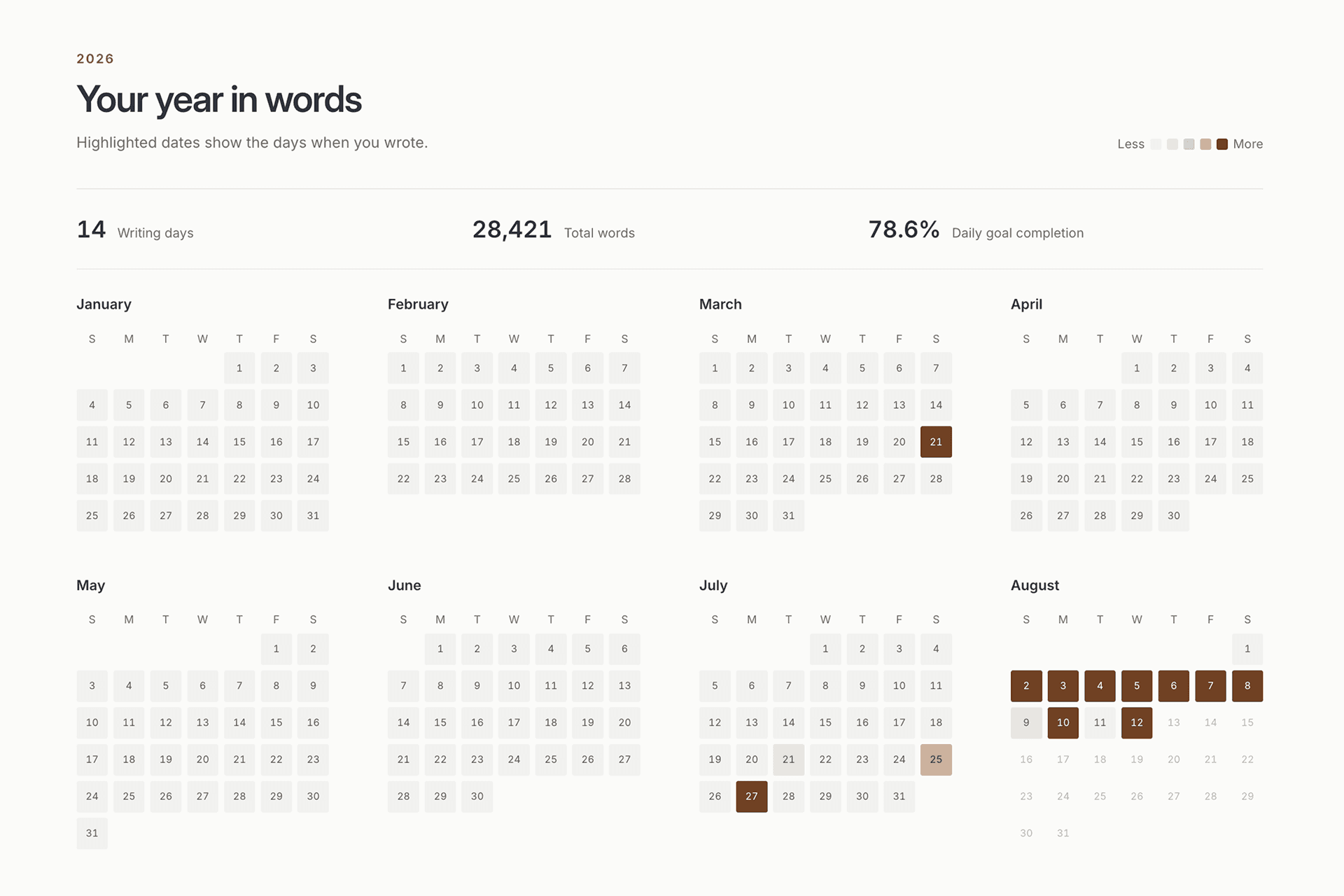
Active time pauses after 90 seconds without editing. That makes it different from the time a document remains open. Focus Mode gives a session a chosen duration and can request browser fullscreen. Writing Journey later shows writing days, completed sessions, active minutes, retained words, usual writing times, achievements, and project activity.
Those measures are useful when your problem is not remembering an event but sustaining a craft. You may be drafting a personal essay over six mornings, testing a short-story voice, or building enough pages to understand what a book wants to be.
Riikee also supports a deliberate writing break. Optional reminders, return prompts, and the 14-day guide can pause while the writing history remains. Ordinary streak and daily-goal rules are not rewritten. The purpose is to reduce pressure without pretending the quiet days never happened.
Daily journaling feels different in each app
Day One's entry can begin from a prompt, template, reminder, photograph, or moment you want to record. Its reminder guide describes daily and custom reminders on supported native platforms, including choices for time, recurrence, journal, tags, and templates.
Riikee's reminder points back to writing itself. You can choose a planned time, a first reminder, an optional second reminder, and weekend behavior. The Writing is an open page rather than a structured life-log entry, so the prompt is lighter and the text can become a journal, scene, essay, or project note.
The better model depends on what starts you.
- If a question, photograph, place, or anniversary gives you something to say, Day One offers more ways to catch it.
- If sitting down and staying with language is the habit you want to build, Riikee records more about the session itself.
Day One streaks count consecutive dates with entries. Its streak guide also allows an entry to be created for a missed date and lets individual journals be excluded from streak counts. Riikee credits writing activity to the local day when the work happened, with a separate eligible Catch Up path for some Pro users. These are different ideas of historical accuracy. Decide whether the date of the remembered event or the date of the writing action matters more to you.
Returning to old material
Day One is unusually strong at resurfacing memory. On This Day brings back entries from the same date in earlier years. Timeline, calendar, media, search, tags, and filters offer other ways through the archive. You do not have to remember the wording of an entry if you remember roughly when or where it happened.
Riikee's Library is organized around finding work you may continue. Search can recover a title or passage. Projects keep related Writings in order. Writing Journey shows when and how you worked, while optional Writing Portrait combines analyzed practices across a period to show recurring themes, forms, and written moods.
The distinction is subtle. Day One often asks, "What was my life like then?" Riikee more often asks, "What have I been writing, and where could I go next?"
Long-form projects
Riikee Projects group Writings inside Sections. A project can have a word goal and deadline, and its Writings can be reviewed in order. The structure is enough for an essay series, dissertation draft, collection, or straightforward book when the writer wants continuity without a dense planning interface.
Day One can separate material into several journals and organize entries with tags and templates. You could keep a research journal, character journal, and drafting journal. That works well when the material is naturally chronological or entry-based.
It is less direct when you need chapter order, a project word goal, or a clear path through related drafts. Day One is not presented as a manuscript manager, and Riikee is not a multimedia memory system. Use the native shape of the app instead of forcing either one to imitate the other.
Privacy and encryption
For highly sensitive journal content, the security model deserves more attention than the editor design.
Day One says end-to-end encryption is enabled by default for current journal content and that only the writer holds the key. Its encryption page explains that entries are encrypted on the device before sync. The web app supports encrypted journals, although initial setup currently requires a mobile or Mac app and the encryption key.
Riikee uses encrypted network connections, authentication, access controls, and managed service providers. You retain ownership of your writing. Riikee does not sell the text, use it for advertising profiles, or use it to train its own AI models. However, Riikee does not claim end-to-end encryption.
That is not a footnote. If your requirement is that the service operator cannot decrypt synced writing, Day One has the documented model that fits. If you use Riikee for sensitive work, read the Riikee Privacy Policy, use a strong unique password, and keep exports of important material.
AI for reflection or assistance
Day One's current Gold plan lists optional reflection tools such as Daily Chat, deeper prompts, entry summaries, and title suggestions. These features fit its journal model: AI helps you revisit or continue thinking about the life recorded in the entries.
Riikee's AI tools sit inside the writing process. They can suggest ideas, build an outline, continue a passage, check spelling and expression, or work with selected text. Nothing replaces the draft until you choose to accept or insert it.
Optional automatic analysis is separate. When enabled, it can analyze eligible saved writing after the session and contribute themes, forms, written moods, and other observations to Writing Portrait. It is not a psychological profile or a quality score.
In both apps, consider what text is processed, which feature triggers the processing, and whether you can keep writing without it. AI should be an optional part of the workflow, especially in a journal.
Native apps and the web
Day One is available across iPhone, Android, iPad, Mac, Apple Watch, Windows, and the web, but features are not identical everywhere. The Day One web FAQ says the web app covers reading, browsing, writing, and editing, while some functions such as template creation, calendar view, and audio transcription remain unavailable there.
Riikee is browser-based. The same main writing environment can be opened on different desktop systems without buying separate native applications. The tradeoff is that it does not have Day One's device-specific capture depth or wearable app.
If you often write at a desk and want the same path on different computers, a browser can be convenient. If you capture moments from a phone, watch, camera, microphone, and location data, Day One's native ecosystem is a stronger fit.
Shared journals or a private solo practice
Day One supports Shared Journals. They can work for family memories, a trip, or another record where invited people contribute entries. Plan limits affect the media each participant can add.
Riikee has no shared editing, invitations, comments, or approval workflow. Projects belong to one writer. That boundary helps keep the writing practice private, but it also means Riikee should not replace a shared journal or collaborative document.
If you plan to write with another person, Day One has the relevant model. If the writing needs simultaneous editing, document comments, and review status, use a collaborative document platform rather than either app.
Can you use both?
Yes, if the boundary is clear.
Day One can hold the memory record: events, photographs, audio, places, and short reflections. Riikee can hold writing that grows from that material: essays, scenes, longer journal explorations, and projects whose progress you want to follow.
Avoid copying every entry between them. That produces two incomplete archives and a recurring maintenance job. Move a page only when it changes purpose. A travel entry might stay in Day One. An image or sentence from it might begin an essay in Riikee.
Export important work from both systems. An app should make an archive easier to use, not become the only place where the archive can exist.
Which should you choose?
Choose Riikee if these sound like your needs:
- You want to practice writing, not only record events.
- Active time, sessions, daily goals, and return patterns would help you build consistency.
- You are developing text-centered drafts or a solo long-form project.
- You want optional generative help and a time-based view of themes across your writing.
- A browser-based workspace suits the devices you use.
Choose Day One if these fit better:
- Your journal should include photographs, video, audio, drawings, location, or other life context.
- On This Day and memory resurfacing are important.
- You require documented end-to-end encryption for synced journal content.
- You want native capture across phones, computers, and a watch.
- You want to invite other people into a shared journal.
If both lists fit, try one ordinary week before importing an archive. Write the same kind of entry you expect to keep making. Then reopen it from another device, search for it, export it, and notice what the app encourages you to do next.
Questions about Riikee and Day One
Is Riikee a Day One alternative?
Riikee is a Day One alternative for text-centered daily writing, drafts, writing sessions, and solo projects. It is not a full replacement for Day One's multimedia journal, On This Day memories, native capture, Shared Journals, or end-to-end encryption model.
Which app is better for journaling?
Day One is stronger for life journaling with media, dates, memories, prompts, and encrypted sync. Riikee is useful when journaling is also a writing practice and you want to follow time, words, themes, and return patterns.
Which app is better for privacy?
Day One documents end-to-end encryption for journal content, which is the stronger model when only the writer should hold the decryption key. Riikee provides private account-based writing and user controls but does not claim end-to-end encryption.
Which app is better for a writing habit?
Both support consistency. Day One uses journal prompts, reminders, templates, and entry streaks. Riikee adds active Writing Sessions, Focus Sessions, daily goals, deliberate breaks, achievements, and Writing Journey statistics.
Can I write a book in Day One or Riikee?
Riikee has the more direct structure for a simple solo manuscript through Projects, Sections, ordered Writings, goals, and deadlines. Day One can collect research and chronological notes, but its primary structure is the journal entry.
Does Riikee have end-to-end encryption?
Riikee does not claim end-to-end encryption. Writers who require that security model should choose a tool that documents and verifies it.
Can several people write together?
Day One offers Shared Journals. Riikee does not offer shared editing or invitations. Neither should replace a collaborative document platform when people need simultaneous editing and review workflows.
Day One preserves the texture around a life. Riikee preserves the path through a writing practice. Choose the one whose archive answers the question you are most likely to ask later.