
A blank writing app can be quiet in two very different ways.
One keeps the file plain, portable, and close to the keyboard. The other keeps the session small enough to repeat tomorrow.
That difference sits behind the Riikee vs. iA Writer comparison. iA Writer is a focused Markdown editor with native applications, local and cloud-connected folders, sentence-level attention tools, previews, and publishing options. Riikee is a browser-based writing practice with a calm rich-text editor, daily goals, Writing Sessions, Focus Mode, Projects, and a history of how you return.
Both products care about distraction-free writing. They disagree about what should surround the empty page.
The short version
Choose Riikee when consistency is the larger problem. It helps you set a writing rhythm, record active sessions, continue across daily pages and Projects, and review the practice over time.
Choose iA Writer when the document and its file format come first. It gives you Markdown, local folder control, syntax and style tools, live previews, and established export and publishing paths.
| Need | Riikee | iA Writer |
|---|---|---|
| Editor model | Rich text with contextual commands | Plain-text Markdown |
| Focus Mode | Timed session with optional browser fullscreen | Dims surrounding text to focus on a sentence or paragraph, with Typewriter Scrolling |
| Habit support | Daily goal, Writing Sessions, reminders, breaks, streaks, achievements, Writing Journey | Document statistics and some platform-specific writing goals |
| File ownership | Account-based writing with export | Local files and cloud-connected folders |
| Long-form structure | Projects, Sections, ordered Writings, goals, and deadlines | Library folders, files, wikilinks, Content Blocks, and metadata |
| Editing help | Optional generative AI and selected-text actions | Syntax Highlight, Style Check, spelling, grammar, and Authorship |
| Output | TXT, Markdown, Word, and PDF depending on plan | Markdown source, preview, DOCX, PDF, custom templates, and blogging connections |
| Platforms | Browser-based | Native apps, with features and purchases varying by platform |
The better app depends on whether you want software to manage the writing practice or protect the document workflow.
Two meanings of Focus Mode
The shared feature name can make the products look more similar than they are.
iA Writer's Focus Mode narrows visual attention inside the document. The active sentence or paragraph stays bright while surrounding text fades. Typewriter Scrolling can keep the cursor vertically centered. The official Focus Mode guide recommends using it during creation and turning it off when the dimming makes editing awkward.
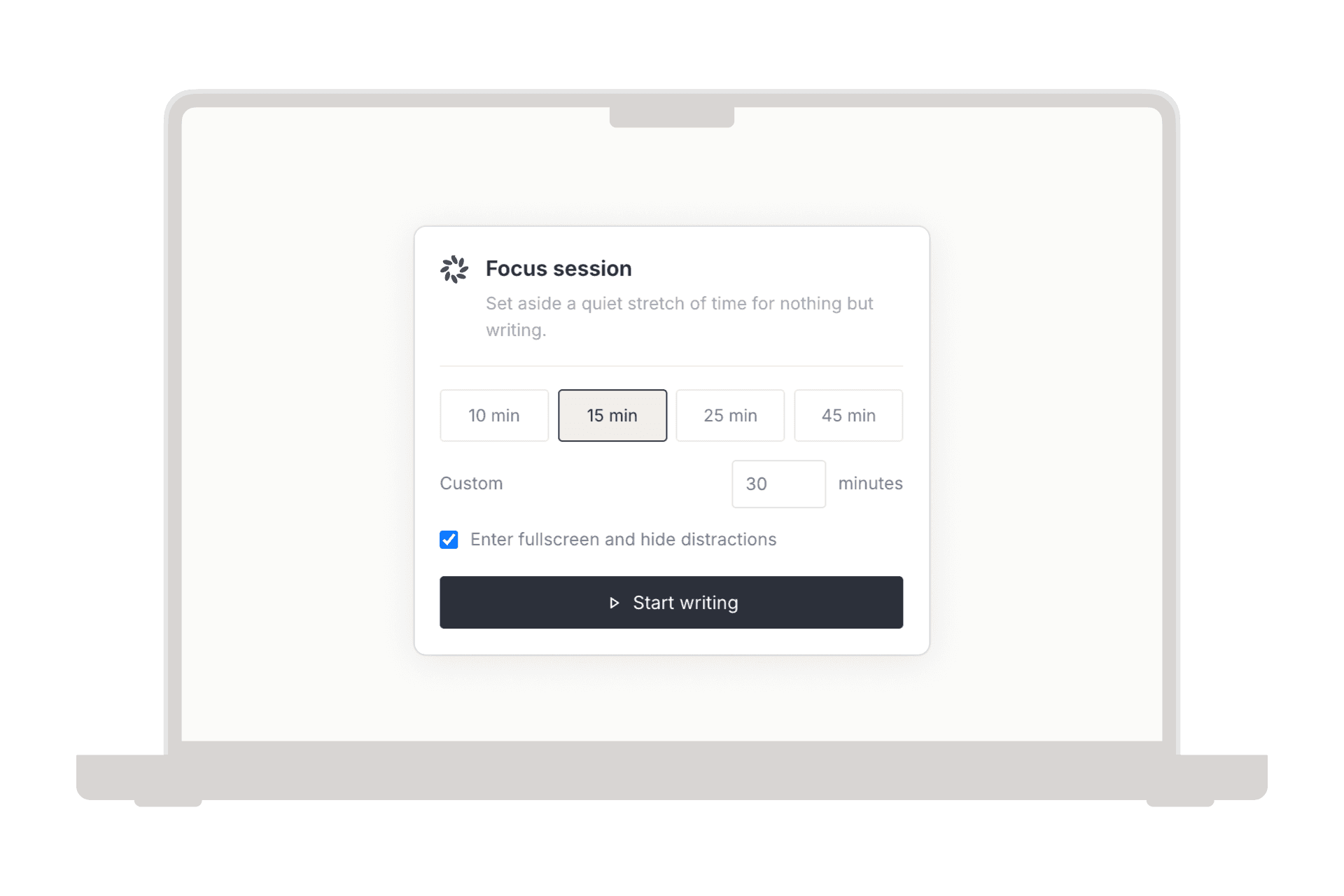
Riikee's Focus Mode creates a timed writing session. You choose a duration and whether to request browser fullscreen. You can pause, resume, or end the session, and Riikee records it separately from ordinary automatic Writing Sessions. It does not dim every sentence around the cursor, and it cannot enable system-wide Do Not Disturb.
So ask what breaks your concentration.
If the surrounding paragraphs keep pulling you backward into revision, iA Writer's sentence or paragraph focus may help. If you postpone writing because the session has no clear boundary, Riikee's timer and history may be more useful.
Rich text or Markdown
iA Writer is built around Markdown. Formatting remains visible as punctuation, and the source stays readable as plain text. Headings, lists, links, images, tables, footnotes, and other structures can be written without a formatting toolbar taking over the page.
The Preview shows how the document will render. iA Writer's current feature matrix lists HTML and PDF preview, equation rendering, metadata, DOCX import and export, PDF export, and custom templates across its main desktop and Apple platforms.
Riikee uses rich text. You select text or open the Slash Menu when you need a heading, list, quote, link, image, or other block. The formatting marks do not remain in the prose. You can export Markdown later on an eligible plan, but Markdown is not the native editing language.
Neither choice is more serious. Markdown is helpful when you want transparent source files, predictable conversion, or a writing system that works with developer and publishing tools. Rich text is easier when punctuation should behave only as punctuation and you want the draft to resemble its reading form.
Use the format you are willing to live with while the piece is unfinished. Converting at the end is easier than resenting the editor every day.
Files or an account-based writing library
iA Writer can work with folders on the device and several connected storage providers. The official feature matrix lists local folders along with iCloud, Dropbox, Google Drive, OneDrive, and other connections, although availability and behavior vary by platform.
That file model has practical advantages. A Markdown document can live in a folder you understand, participate in an existing backup system, and open in another text editor. You can use wikilinks, Content Blocks, metadata, and folder structure without hiding the source inside a proprietary project database.
Riikee saves signed-in writing to an account. Library, Projects, Writing Journey, and session history depend on that service model. The browser gives you a consistent main workspace across operating systems, but the live source is not a local Markdown folder.
Riikee exports give you a copy outside the service. Guests and Basic members can export TXT; Pro members can also export Markdown, Word, and PDF. Export important work regularly if you do not want any service to be the only home for it.
If direct control of plain files is a requirement, iA Writer has the clearer model. If you prefer to sign in and let the writing history travel with the account, Riikee reduces file management.
Building a writing habit
iA Writer removes visual friction and opens quickly into a document. It includes word count, character count, estimated reading time, and other statistics. Its Windows feature set also includes writing goals. Those tools can support a routine, but the product is mainly organized around documents.
Riikee treats the routine as product data. Automatic Writing Sessions form around signed-in editing. Active time pauses after 90 seconds without changes. Daily goals, reminders, streaks, deliberate breaks, a 14-day guide, Focus Sessions, and achievements all feed Writing Journey.
The difference becomes visible after a missed week. iA Writer still gives you the file exactly where you left it. Riikee can also show when you usually write, how long your active sessions tend to be, and whether a smaller return plan would fit your recent pattern.
This does not make Riikee a better editor. It makes it more opinionated about repetition. If you already write steadily, the extra habit layer may be unnecessary. If your drafts disappear because you stop returning, file portability alone may not solve the problem.
Editing the sentence
iA Writer has a distinctive set of non-generative editing tools.
Syntax Highlight can mark parts of speech so nouns, verbs, adjectives, adverbs, conjunctions, and other elements become easier to inspect. Style Check can flag fillers, clichés, redundancies, and custom patterns. The iA Writer editor overview also describes Authorship, which helps distinguish text you wrote from material with another source.
These tools do not need to propose a replacement paragraph to be useful. They change what you notice in the sentence. A page crowded with weak verbs or repeated nouns becomes visually obvious, and you decide what to rewrite.
Riikee provides optional AI checks for spelling and expression, plus selected-text actions for rewriting, expanding, shortening, changing tone, or asking for advice. It can also create ideas, outlines, and continuations. Nothing replaces your text until you accept or insert it.
Choose iA Writer when you want the editor to expose language patterns while leaving the revision to you. Choose Riikee when you sometimes want a proposed alternative or help generating the next passage. Either way, read the original and suggestion side by side. A smoother sentence can still be the wrong sentence.
Organizing long work
iA Writer's Library organizes files and locations. Folders, wikilinks, Content Blocks, metadata, hashtags, search, and preview can support a substantial collection of Markdown documents. Content Blocks let one file include material from another, which is useful for assembling reusable or modular text.
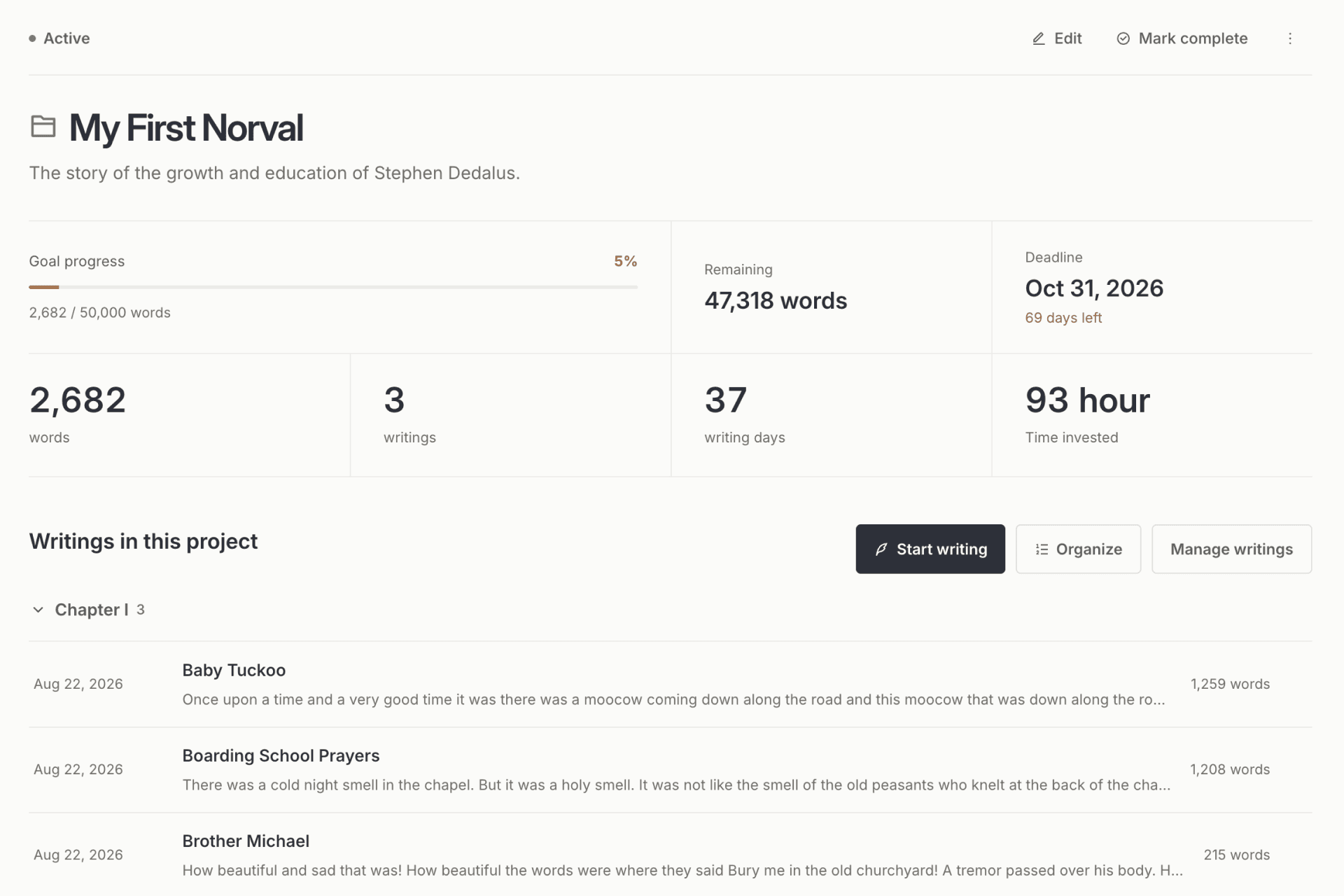
Riikee Projects give the work a more visible project boundary. Sections can represent parts or chapters. Writings have a defined order, and the project can have a word goal and deadline. Project statistics show writing days, words, and time connected with that work.
Riikee's model is easier to read if you think in chapters and progress. iA Writer's model is more flexible if you already think in files, links, and folders.
Neither one is a full editorial production system. Riikee does not have complex compilation or version snapshots. iA Writer's file library is not a shared review workflow. A book with deep research, index-card planning, or complex output may need another tool.
Publishing and export
iA Writer has the stronger direct publishing path. Its feature matrix lists connections for services such as Ghost, Medium, WordPress, Micropub, and Micro.blog on supported platforms. It also offers live preview, custom templates, PDF, and DOCX.
Riikee exports individual writing so you can back it up or move it into the next stage. It does not publish directly to a blog and does not include a website delivery workflow.
That boundary can be helpful when the private draft and public version should remain separate. It can also be inconvenient if you publish frequently and want one command from editor to site.
Choose according to the last mile you repeat. If Markdown goes straight into a CMS, iA Writer may remove several steps. If writing is exploratory and publication happens elsewhere after a deliberate handoff, Riikee's separation may feel cleaner.
Platform and pricing model
iA Writer is sold as native software, and current features vary across iPhone, iPad, Mac, and Windows. The company's pricing page explains that purchases are generally platform-specific and that a one-time payment covers the current major version rather than guaranteeing every future major upgrade. Check the page for current platform options and prices.
Riikee is a web subscription service with Basic and Pro access. You sign in through a browser rather than buying a separate native license for each desktop operating system.
A one-time native purchase and a web subscription carry different tradeoffs. Native software can fit a file-based, offline-first workflow. A service can update the same account and history without manual library setup. Consider several years of use, not only the amount due today.
Privacy and AI boundaries
iA Writer can keep documents in a local folder, which lets you choose how and whether those files sync. If you connect a cloud provider, that provider's security and account model become part of the system. Local control is useful, but it does not remove the need for device encryption and backups.
Riikee stores signed-in writing with its service providers so Library, sessions, Projects, and Writing Journey can work across visits. Riikee does not sell your writing, use it for advertising profiles, or use it to train its own AI models. Text needed for an AI command or enabled background analysis may be processed by an AI provider under the Riikee Privacy Policy.
If you want to keep a manuscript out of all account-based writing services, iA Writer with a carefully managed local folder is the more direct fit. If you use Riikee, keep AI analysis off for material you do not want processed and export important writing.
Can you use both?
A two-stage workflow can work if each app has one job.
Use Riikee for the daily practice, exploratory drafts, and project rhythm. Export a stable draft as Markdown, then move it into iA Writer for syntax review, Style Check, file-based organization, preview, and publishing.
The reverse can also work. Draft in iA Writer when Markdown and sentence focus matter, then bring selected text into Riikee if you want it connected to a broader writing practice. The limitation is that session history begins only when the writing happens inside Riikee. Importing a finished file cannot reconstruct the active time behind it.
Do not shuttle the same live draft back and forth after every session. Choose a handoff point and keep one source of truth.
Which should you choose?
Choose Riikee if these statements fit:
- I need help returning to writing more than I need help managing files.
- A timed Focus Session and active-time history would make the work easier to plan.
- I prefer rich text and contextual formatting.
- I want Projects, daily goals, reminders, breaks, and writing statistics in one account.
- I want optional generative AI inside the writing process.
Choose iA Writer if these fit better:
- Markdown is the format I want to write and keep.
- I want local files or direct control over connected folders.
- Sentence focus, Syntax Highlight, and Style Check match how I revise.
- Preview, custom templates, export, or direct blog publishing is part of my regular workflow.
- I prefer native software and understand the platform-specific purchase model.
If you are uncertain, test the most annoying part of your real process. Do not compare two pristine blank pages. Resume a neglected draft, revise a difficult paragraph, find a file from last month, and export something you would actually send.
Questions about Riikee and iA Writer
Is Riikee an iA Writer alternative?
Riikee is an iA Writer alternative for distraction-free writing, daily practice, simple Projects, Focus Sessions, and optional AI help. It does not replace iA Writer's native Markdown files, sentence-level Focus Mode, Syntax Highlight, Style Check, previews, or publishing connections.
Which app is better for Markdown?
iA Writer. Markdown is its native writing model. Riikee can export Markdown on an eligible plan, but the editor itself is rich text.
How are their Focus Modes different?
iA Writer dims text outside the active sentence or paragraph and offers Typewriter Scrolling. Riikee creates a timed Focus Session with optional browser fullscreen and records it in Writing Journey.
Which app is better for a daily writing habit?
Riikee has the broader habit system through daily goals, automatic Writing Sessions, reminders, deliberate breaks, streaks, achievements, a 14-day guide, and Writing Journey. iA Writer offers a low-friction editor and document statistics, which may be enough if your routine already works.
Which app is better for editing style?
iA Writer's Syntax Highlight and Style Check expose parts of speech, fillers, clichés, redundancies, and custom patterns without generating a replacement. Riikee is stronger when you want an optional AI suggestion, rewrite, expansion, or continuation.
Can I keep files locally in Riikee?
Riikee's signed-in library is account-based rather than a local Markdown folder. You can export copies. iA Writer is the clearer choice when local files are a firm requirement.
Which app is better for publishing a blog?
iA Writer has previews, templates, exports, and direct connections to several blogging services on supported platforms. Riikee exports writing but does not publish directly to a blog.
iA Writer keeps the document simple enough to travel. Riikee keeps the session visible enough to repeat. Pick the kind of continuity your writing lacks.